
This page explains the REST Adapter in Bridge context. If you were looking for the same information regarding the PAS Designer, refer to REST Adapter in the Designer guide.
Using the REST Adapter, you can overwrite the settings coming from the component diagram dynamically.
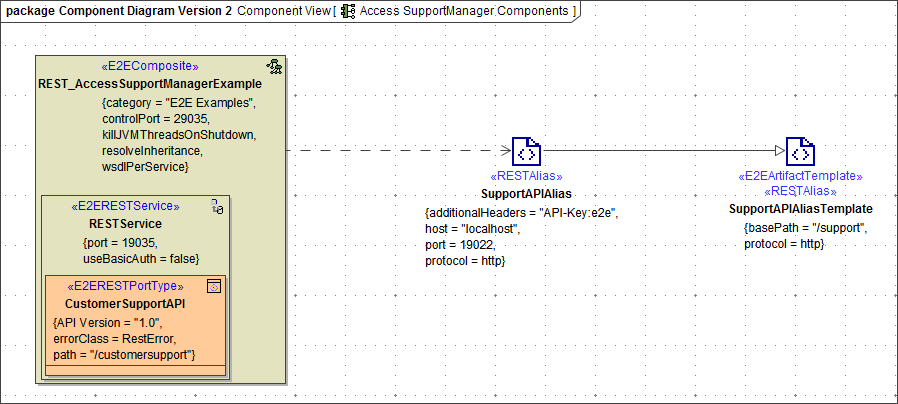
Figure: REST Adapter Components
You can do this by
-
creating an object of type RequestOptions, ...
-
setting the attributes and ...
-
providing this to the adapter call.
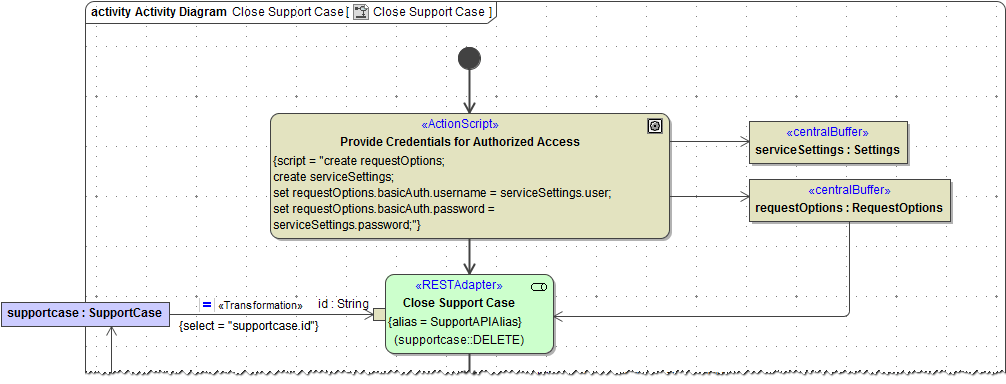
The figure below shows an example adapter call with request options.
Figure: Setting the Request Options Dynamically
Overview of Request Options Attributes and Elements
|
Attribute |
Type |
Description |
Values/Example |
|---|---|---|---|
|
additionalHeaders |
Array of HeaderField |
All REST request header fields as an array of HeaderField classes containing name/value pairs. |
|
|
options |
Array of Option |
Specify native cURL options as listed in Setting cURL Options on the URL Adapter . Use one of the following syntax rules:
|
|
|
ssl |
SSL |
Use this parameter to supply SSL information. |
|
|
proxy |
Proxy |
Use this parameter to supply necessary proxy information. |
|
|
additionalQueryParameters |
Array of Parameter |
Use this parameter to provide additional query parameters to the REST service call. |
|
|
followRedirects |
Integer |
Specify here the maximum number of redirects to follow. |
any integer |
|
basicAuth |
Authentication |
This parameter provides an object of type Authentication containing the user and the password. |
|
|
basePath |
String |
Overwrite here the base path of the REST service. |
a valid path, e.g. |
|
host |
String |
Overwrite here the host running the REST service that has been defined in the component diagram. |
|
|
port |
Integer |
Overwrite here the port through which the REST service is accessible. |
|
|
protocol |
String |
Overwrite here the protocol through which the REST service is accessible. |
http, https |
|
ignoreHttpErrors |
Boolean |
If true, HTTP error codes >= 400 will not cause an exception in the model. This implies, that the response body is accessible even if HTTP errors occur. Default value is true. |
true / false |
|
jsonComposerOptions |
ComposerOptions |
Use this parameter to specify JSON composer options on the REST call. You can use these options to e.g. overwrite jsonKeepNulls from the REST alias. |
|