
After having imported the EDIFACT message definition, you can parse such EDI data by invoking a <<EDIFACTAdapter>> or <<X12Adapter>> action as shown in the examples below.
|
Name |
Mandatory |
Description |
Allowed Values |
|
|---|---|---|---|---|
|
action |
|
Specify the action of the adapter: parse or compose. |
compose |
Compose a file or file blob from a given EDI data structure. |
|
parse |
Parse an EDI file or file blob to an EDI data structure. |
|||
|
alias |
|
Specify an alias that links to an input file defined in the component diagram. |
a valid <<FileAlias>> |
|
How to debug an adapter call is described on Debugging a UN/EDIFACT Adapter Call.
Static Parsing
For a static parsing, the EDI data file to be parsed is specified via an <<Alias>> adapter action.
Figure: UN/EDIFACT Static Parsing
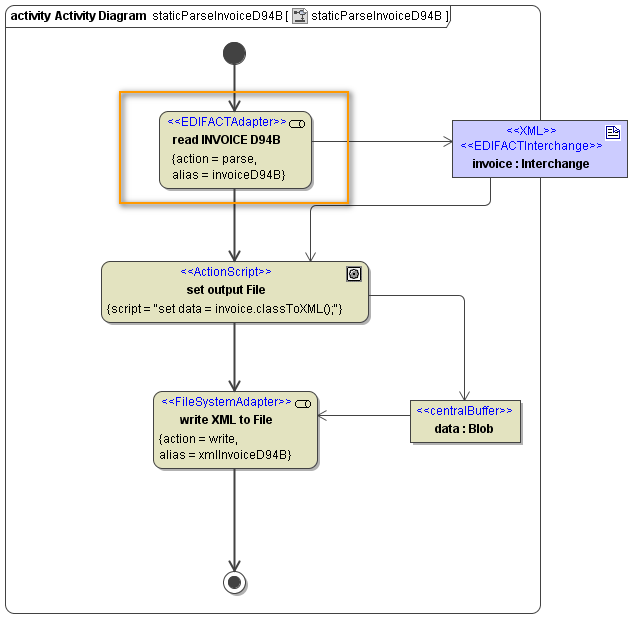
The alias must have been defined in the component diagram as a <<FileAlias>> before. The path and file name can be changed in the xUML Service Settings.
For further details on how to define a file service see File System Components.
Dynamic Parsing
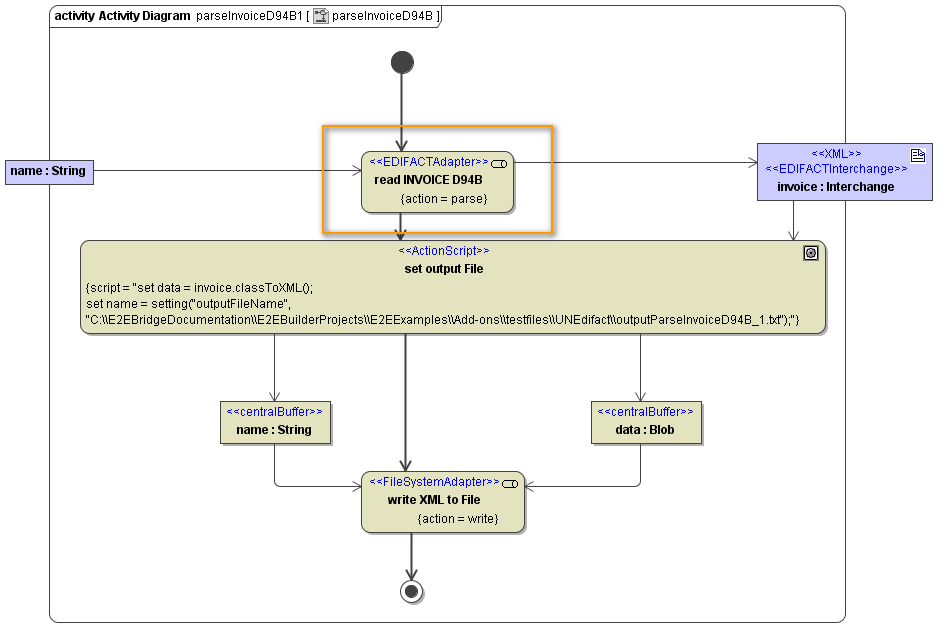
For dynamic parsing, the EDI data to be parsed is given via a file path (name) or a blob object containing the data (data).
Figure: UN/EDIFACT Dynamic Parsing
|
Name |
Type |
Direction |
Mandatory |
Description |
Allowed Values / Example |
|
|---|---|---|---|---|---|---|
|
name |
String |
in |
( |
Specify a full path to an EDI File containing a UN/EDIFACT or X12 message.
|
|
|
|
data |
Blob |
in |
( |
Provide the EDI data to be parsed.
|
|
|
|
encoding |
String |
in |
|
Provide the encoding of the EDI data to be parsed as specified in the Charset Definitions appendix. |
any valid encoding (see Charset Definitions)
|
|
|
default |
|
|||||
|
locale |
NumbersLocale |
in |
|
Specify how number values will be treated, when parsed from the EDI data (decimal point, currency symbol, ...). You can overwrite the system locales here, if the file was written with divergent locales. Refer to Number Formatting for more information. |
default |
system locales |
|
<any> |
Any
|
out |
|
The adapter returns a parsed EDI object. The class defining the type of this object should have stereotype <<EDIFACTInterchange>> or <<X12 Interchange>>. |
|
|
encoding and locale can also be used for static parsing.