
Using the MailClient you can list folders, check their presence, as well as create and delete them:
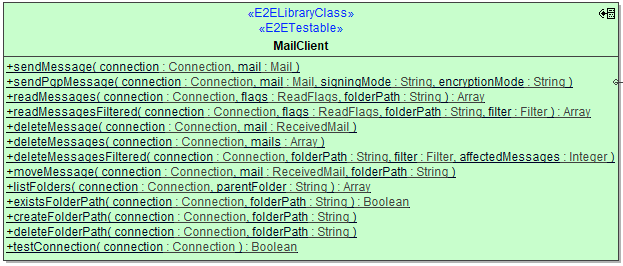
Operations expecting a folderPath argument will treat this the following way:
|
Folder Path |
Description |
Example |
|---|---|---|
|
NULL |
This is interpreted as meaning the |
|
|
path beginning with |
This is interpreted as a path from the mail connections root folder. |
|
|
path not beginning with |
This is interpreted as a relative path to the |
|
The intention of this behavior is to abstract away the fact that <Inbox> has many different names depending on the connection, i.e. IMAP typically uses INBOX, Exchange calls it Inbox, and a German Exchange calls it Posteingang.
Also note that POP3 does not support folders other than <Inbox>. Hence when you specify a POP3 connection, folderPath parameters other than NULL will raise an exception.
Operations
listFolders
|
Parameter |
Types |
Direction |
Description |
Allowed Values / Example |
|
|---|---|---|---|---|---|
|
connection |
JavaMail Library Reference | JavaMailLibraryReference Connection |
in |
Specify the Connection object defining the mail server connection parameters to use (see Mail Server Connection). |
|
|
|
parentFolder |
String |
in |
Specify the path to the parent folder. See note regarding folder handling . |
NULL |
List folders below |
|
\ |
List folders below root folder. |
||||
|
a path |
List folders below given path. |
||||
|
folders |
Array of String |
return |
Returns a recursive list of sub-folder paths. |
|
|
existsFolderPath
|
Parameter |
Types |
Direction |
Description |
Allowed Values / Example |
|
|---|---|---|---|---|---|
|
connection |
JavaMail Library Reference | JavaMailLibraryReference Connection |
in |
Specify the Connection object defining the mail server connection parameters to use (see Mail Server Connection). |
|
|
|
folderPath |
String |
in |
Specify the path to the folder to check. See note regarding folder handling . |
|
|
|
exists |
Boolean |
return |
Returns if the given folder is existent on the mail server. |
true |
Folder exists. |
|
false |
Folder does not exist. |
||||
createFolderPath
|
Parameter |
Types |
Direction |
Description |
Allowed Values / Example |
|
|---|---|---|---|---|---|
|
connection |
JavaMail Library Reference | JavaMailLibraryReference Connection |
in |
Specify the Connection object defining the mail server connection parameters to use (see Mail Server Connection). |
|
|
|
folderPath |
String |
in |
Specify the path to the folder to be created. See note regarding folder handling . |
|
|
deleteFolderPath
|
Parameter |
Types |
Direction |
Description |
Allowed Values / Example |
|
|---|---|---|---|---|---|
|
connection |
JavaMail Library Reference | JavaMailLibraryReference Connection |
in |
Specify the Connection object defining the mail server connection parameters to use (see Mail Server Connection). |
|
|
|
folderPath |
String |
in |
Specify the path to the folder to be deleted recursively. See note regarding folder handling . |
|
|